Region
At a glance
- What the view shows: how large is this connected low-density or high-density region, and where is it narrowest? The upper airway is the canonical case.
- Start: scroll the scout to the middle of the target, pick a density preset (Air / airway, Soft tissue, Bone, or Tooth / root), drag a bounding box just around the target, then click a seed well inside it.
- Three gestures: on the scout, drag draws the box, a click drops the seed, and the wheel scrolls the slice. The Keys card lists every gesture of the mode.
- Leave it for: anything a density threshold cannot separate: the grow follows density, not anatomy, and its numbers describe the mask, nothing more.
What this mode is for
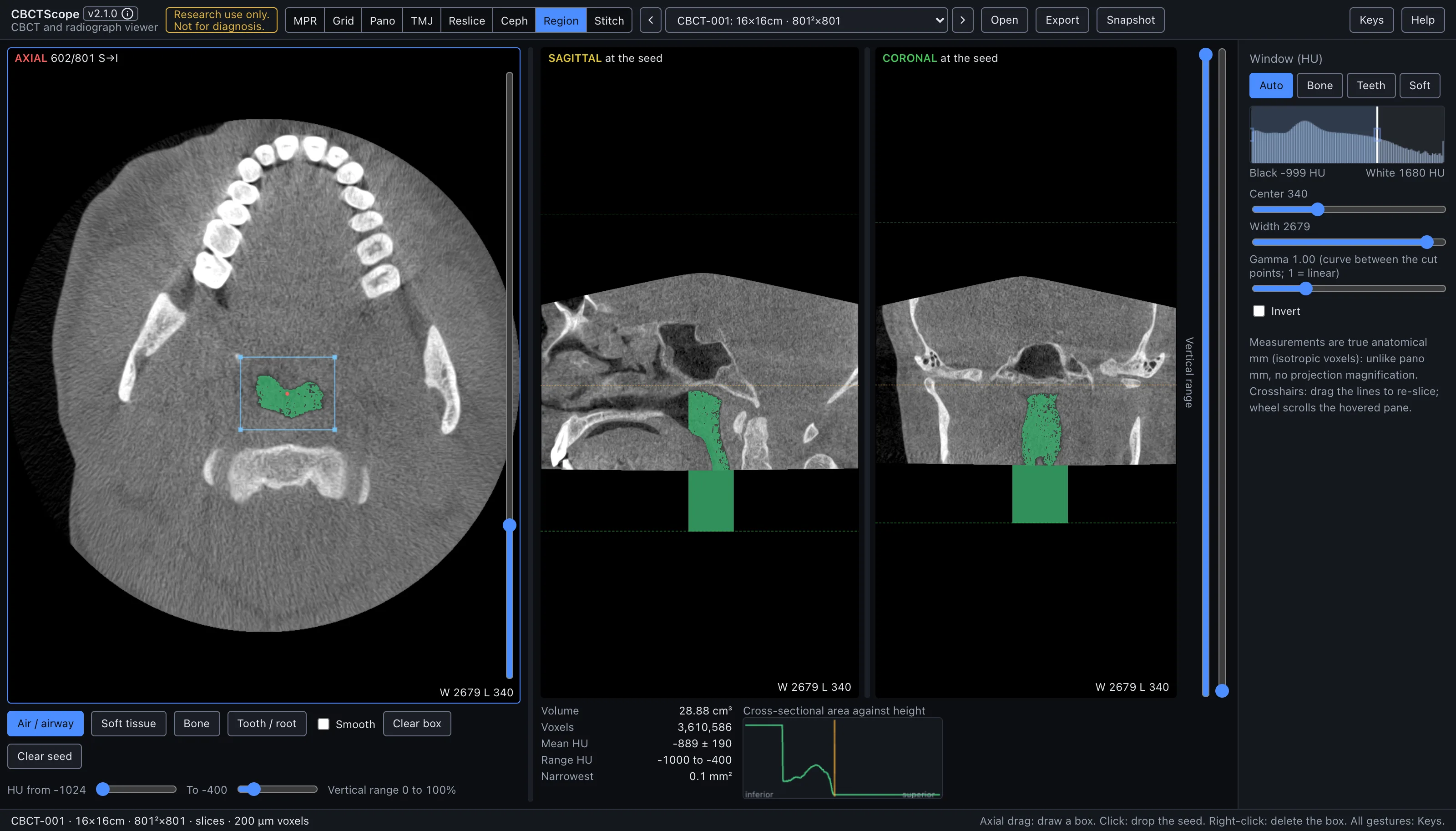
Region segments a connected structure by density: draw a bounding box on the axial scout, pick a density range, click a seed inside the target, and every connected voxel in range floods out into a mask shown over all three orthogonal planes, with its volume, density statistics, and a cross-sectional area profile by height. It answers the quantitative navigation questions: "how large is this connected low-density or high-density region, and where is it narrowest?", with the upper airway as the canonical case.
Gestures
| Gesture | Where | Action |
|---|---|---|
| Drag | scout | Draw the bounding box; it limits how far the fill can spread in-plane, and without a box the whole slice extent is used |
| Click | scout | Drop the seed; it must land on a voxel inside the density range, or the grow reports nothing and asks for a better seed or a wider range |
| Wheel | scout | Scroll the slice; the caption uses the MPR axial count (S→I, slice 1 at the top) |
| Double-click a slider | controls | Reset it |
The controls
| Control | Options or range | What it does |
|---|---|---|
| Panes | axial, sagittal, coronal | Each shows its plane top left (AXIAL n/N, or "at the seed" for the two planes cut through the seed) and the window bottom right. The pane that takes the wheel carries a thin blue frame, and the axial level is the reading place shared with the other modes (section 3.3). |
| Density presets | Air / airway (-1024 to -400 HU), Soft tissue (-200 to 300 HU), Bone (400 to 3000 HU), Tooth / root (900 to 2600 HU) | The density range the fill may include; the selected preset is solid blue. |
| HU from, To | two sliders | Set the range manually; touching them clears the preset selection. Double-click returns to the last preset. |
| Smooth | checkbox | One pass of morphological closing that fills pinholes in the mask. |
| Vertical range | two handles right of the planes | How far up and down the grow may reach; dashed green lines on the sagittal and coronal panes show where the bounds sit, and double-click on a handle resets it. |
| Clear box | button | Removes the bounding box; the seed and mask stay, regrown against the whole slice footprint. |
| Clear seed | button | Removes the seed, the mask, and the statistics; the box stays for the next seed. |
| Results panel | read-only | Volume in cm3, voxel count, mean HU with standard deviation, HU range, and the narrowest cross-sectional area in mm2. A warning appears if the grow hits the 4-million-voxel cap, meaning the box or range should be tightened. |
| Cross-sectional area against height | graph | The masked area at each height, inferior to superior, with the narrowest non-empty slice flagged; the same level is marked with a dashed line on the sagittal and coronal panes, which are cut through the seed and show the mask as a green overlay. |
| Window | shared sidebar | The shared Window (HU) presets, center, width, and invert control the underlying grayscale; the mask overlay is independent of the window. |
A reading workflow
- Scroll the scout to a level through the middle of the target and pick the density preset that matches it, or set the HU range by hand.
- Drag a bounding box just around the target, tight enough that the fill cannot escape into connected structures of similar density outside the region of interest.
- Click a seed well inside the target, away from its walls, so partial-volume voxels at the boundary do not decide where the fill starts.
- Check the mask on all three planes before trusting any number: the statistics describe the mask, and the mask is only right if it covers the target and nothing else.
- If the mask leaks, tighten the box, narrow the range, or pull in the vertical range; if it under-fills, widen the range or enable Smooth to close pinholes.
- For an airway view: the Air / airway preset, a box around the pharynx, seed in the air column; the graph then gives the area at each height with the narrowest slice flagged.
- Read the narrowest level on the sagittal and coronal panes at the dashed line, not only on the graph.
- Record the numbers together with the range and box that produced them; a segmentation statistic without its threshold settings is not reproducible.
Over MCP
open_scan, list_volumes, select_volume, set_view_mode (mode region),
set_window_level, and snapshot apply; the snapshot captures the scout, the seed
planes with the mask, and the on-screen panels. navigate_slice has nothing to move here (it works in MPR, grid, and pano) and answers with a clear error; box, seed,
and range are on-screen controls with no agent verb, and no verb returns the statistics.
Example sequence: set_view_mode to region, snapshot.
Limits
The grow is thresholded connectivity, nothing more: it follows density, not anatomy, and it will happily include anything connected and in range inside the box. CBCT HU values are approximate by nature, so the preset ranges are starting points and the absolute statistics are not calibrated densitometry. Airway dimensions also depend on posture, breathing phase, and tongue position at acquisition, which a single static scan cannot standardize. The mask is session state and is not saved. CBCTScope is navigation and visualization only: no findings, no diagnoses. Research use only; not a medical device.